Book without the back-and-forth.
Let customers request appointments, check upcoming visits and receive relevant reminders.
CUSTOMER EXPERIENCE
Give your customers more than a website. Give them a place to do business with you.
A custom web app puts appointments, messages, documents, invoices and useful updates in one branded experience. On supported devices, customers can add it to their home screen—keeping your business in their pocket.

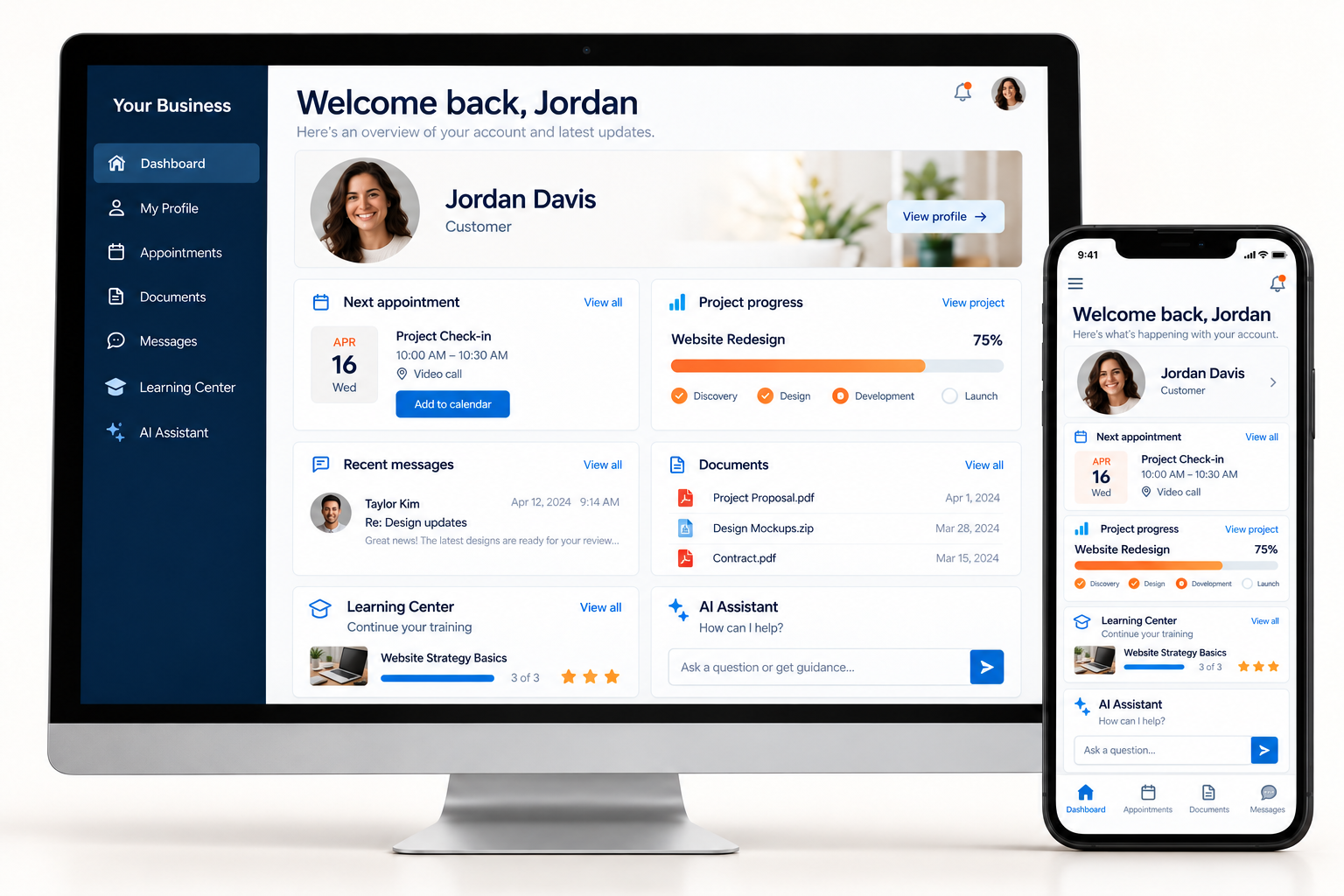
ONE CUSTOMER. ONE CONNECTED EXPERIENCE.
A familiar face, a clear dashboard, the Learning Center, and an optional AI Assistant—wherever your customer signs in.
SET A NEW STANDARD FOR YOUR BUSINESS
Your customers should know where to go, what happens next, and how to reach you.
Let customers request appointments, check upcoming visits and receive relevant reminders.
Bring customer questions, project updates and support requests into the same experience.
Replace selected disconnected tools with a platform built for your business, with agreed data ownership, access controls and export options.
TRY YOUR CUSTOMER’S EXPERIENCE
Edit the sample profile, preview a photo, explore the dashboard, and try learning and assistance in the same app.
Interactive customer example · fictional data. Changes and photo previews stay in this page’s memory and reset on reload. Use sample details. Messages, appointments and notifications are simulated.
YOUR CUSTOMER WORKSPACE
NEXT APPOINTMENT
Thursday · 10:00 AM · Example meeting
PROJECT PROGRESS
75% · Design approved · fictional status
Proposal and design review files.
Send a question or review a project update.
Lessons, quizzes, completion stars and printable sample awards.
Optional help with your portal and next steps.
A CUSTOMER EXPERIENCE THAT GOES WITH THEM
Give clients a branded mobile experience they can return to for appointments, messages, documents, invoices and progress updates. Your business becomes easier to reach—and easier to come back to.
With permission, notifications can remind customers about appointments, ready-to-review work, outstanding requests and service renewals.
An installable web app can put your branded portal alongside the apps they use every day, on supported devices.
Make the next booking, payment or conversation convenient. Keep customers connected with timely, relevant updates.
Interactive concept with fictional data. Push notifications require customer opt-in and supported browser/device installation. A native App Store app is a separately scoped option. This example does not send real notifications. Assistant responses are scripted examples; AI is an optional configured add-on.
YOUR CUSTOMER PORTAL
Everything you need, in one place.
Design review is ready
November 4 · 10:00 AM
Sample balance · $450
Try the tabs. Preview a notification.
See how your clients stay connected.
INVITE. WELCOME. CONNECT.
Introduce their new app with a branded invitation, then guide them through their first confident visit.
1 · INVITE YOUR CUSTOMERS
Your team can invite customers into a branded portal instead of sending them to another company’s software.
Invitation delivery, expiry, resend controls and acceptance tracking are scoped into your platform. SMS needs a messaging provider and applicable consent. This public demo creates no account and sends no messages.
2 · MAKE IT EASY TO COME BACK
Practice each step here, then follow the same process on your own device. No external guide needed.
INTERACTIVE IPHONE WALKTHROUGH
STEP 1 OF 5
Tap the Safari browser below to practice.
Illustrated browser controls, not actual system dialogs. Menus, installation and notification support vary by device, browser and finished app. Desktop walkthrough: Chrome / Edge. On Mac Safari, Add to Dock is a separate browser option where supported. Notification permission is always your choice.
3 · STAY USEFUL BETWEEN VISITS
Turn an update into a useful next step. Notifications can bring customers back to an appointment, a document that needs review, or a service they’re ready to book.
Give people control: clear opt-in, relevant categories, quiet hours and a simple way to turn notifications off. Keep sensitive information inside the signed-in portal.
Push delivery is not guaranteed. It requires an implemented notification service, permission and supported devices. Email or SMS alternatives can be scoped separately. The preview above simulates notifications.
YOUR BUSINESS · SAMPLE NOTIFICATION
Your appointment is tomorrow. Open your app for details.
YOUR BUSINESS · SAMPLE NOTIFICATION
Your team has posted an update. View it securely in your portal.
YOUR BUSINESS · SAMPLE NOTIFICATION
New opening hours and helpful service news—all in one place.
BUILD FOR WHAT COMES NEXT
As AI and automation change how businesses operate, a connected customer platform gives you a practical place to start.
Organize your information, connect your workflows, and give customers a reliable way to interact with your business. Then add an AI assistant or approved automation where it genuinely helps—answering routine questions, preparing requests and handing off to your team.
AGI has no dependable arrival date. Your opportunity does not depend on one. Start improving the customer experience now, before disconnected processes become harder to change.
Put the services your customers use most in easy reach.
Map requests, appointments, approvals and follow-ups to real business processes.
Define permissions, reliable knowledge, human review and industry-specific requirements before activation.
QUESTIONS ABOUT YOUR CUSTOMER APP
No. Customers can use the web portal in a browser. Home-screen installation is an optional convenience on supported devices.
We can build staff invitation workflows with branded email, secure expiring links, resend controls and acceptance tracking. Importing contacts, consent records and SMS delivery are agreed during scoping. The public invitation preview does not send messages.
We identify the customer-facing workflows to replace, validate the required capabilities, and plan data migration. Selected subscriptions and per-seat fees can be eliminated when their workflows are replaced; hosting, management and optional service usage still have costs.
This page demonstrates a responsive web app. An installable web app and its notification features are engineered and tested as part of your scope. Native App Store and Google Play applications are separately scoped options.
No blanket compliance claim applies. AI is optional, and requirements depend on your industry, data, providers and use cases. We scope permissions, privacy, vendor requirements and human oversight for your deployment.
AVAILABLE AS A SCOPED UPGRADE
Extend your website or platform with approved customer assistance, intake, reminders and staff handoffs. Plan access permissions, knowledge sources, usage costs and human review before activation.
Explore upgrade options →Readiness and compliance requirements are assessed per deployment. Upgrade scope and any provider usage costs are confirmed in your proposal.
REPLACE SUBSCRIPTIONS. SAVE MONEY. TAKE OWNERSHIP.
Identify the workflows to replace, the data to migrate, and the capabilities your customers need. Scope, costs and ownership terms are agreed before development.
Plan your platform →